
Conectivity Exception - Even when Appium Studio is started and running on the same port

I have downloaded and installed the Appium Studio. Kept it running and tried to execute appium tests from an IDE. But I am getting connectivity problem saying “Appium Studio might not have started or not running on the same port”. I have checked the port and tried changing and running it, or restarting or deleting the app and reinstalling it. But we are getting the error on one mac machine. However studio runs fine on the rest of the machine.
We are able to run and record the tests using appium studio but we are facing this problem on IDE’s. We are using IntelliJ. Please help.

Thanks in advance.
Ashraf
Hi Ashraf,

Can you share the version of Appium Studio that you installed and a code snippet?

we made a major change in the 10.9 version, and older clients are not supported for now (it’s still not a final release)

in any case, you can try modifying the client initiations and use native Appium driver
Example

protected IOSDriver<IOSElement> driver = null;
// capabilities setup...
driver = new IOSDriver<>(new URL("http://localhost:4723/wd/hub"), dc);

Thanks a lot Tom,

However I am still using Appium Studio 8.4. Here is the code sniplet I am using to create the driver:

DesiredCapabilities dc = new DesiredCapabilities();
dc.setCapability(SeeTestCapabilityType.REPORT_DIRECTORY, reportDirectory);
dc.setCapability(SeeTestCapabilityType.REPORT_FORMAT, reportFormat);
dc.setCapability(SeeTestCapabilityType.TEST_NAME, testName);
//dc.setCapability(MobileCapabilityType.UDID, “0988beed027f8ab4”);
dc.setCapability(AndroidMobileCapabilityType.APP_PACKAGE, “com.xxx.xxx”);
dc.setCapability(AndroidMobileCapabilityType.APP_ACTIVITY, “com.xxx.yyyy.zzz.MainActivity”);
driver = new SeeTestAndroidDriver<>(new URL(“http://” + host + “:” + port), dc);

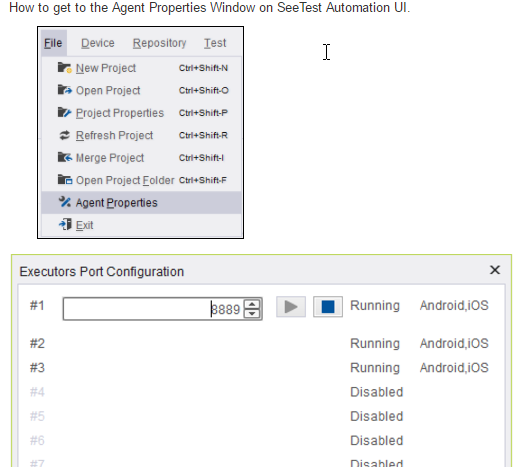
can you add a screen shot of the Agent? and the value of host \ port strings from your code?

I have already checked the agent and it’s the same as your screenshots.

that’s weird, where are you trying to connect from? is the driver running on the same PC as Appium Studio instance?

is there a chance that the process that runs the client (e.g intelliJ \ Eclispe) is blocked on outgoing connection to host+port of Appium Studio?

Could you provide some more info?

if you are still facing the issue, we can set up a call to try and resolve it

1 Like

I have checked and found that the URL: http://repo.experitest.com:8010/Maven2 is not working anymore, we were facing the issue after updating. So we changed the URL to http://repo.experitest.com:8010/Maven2/?C=M;O=A (Last Modified) and now we are successfully running the tests from the IDE. Thanks

1 Like